


 Apr 03,2026
 By docstrail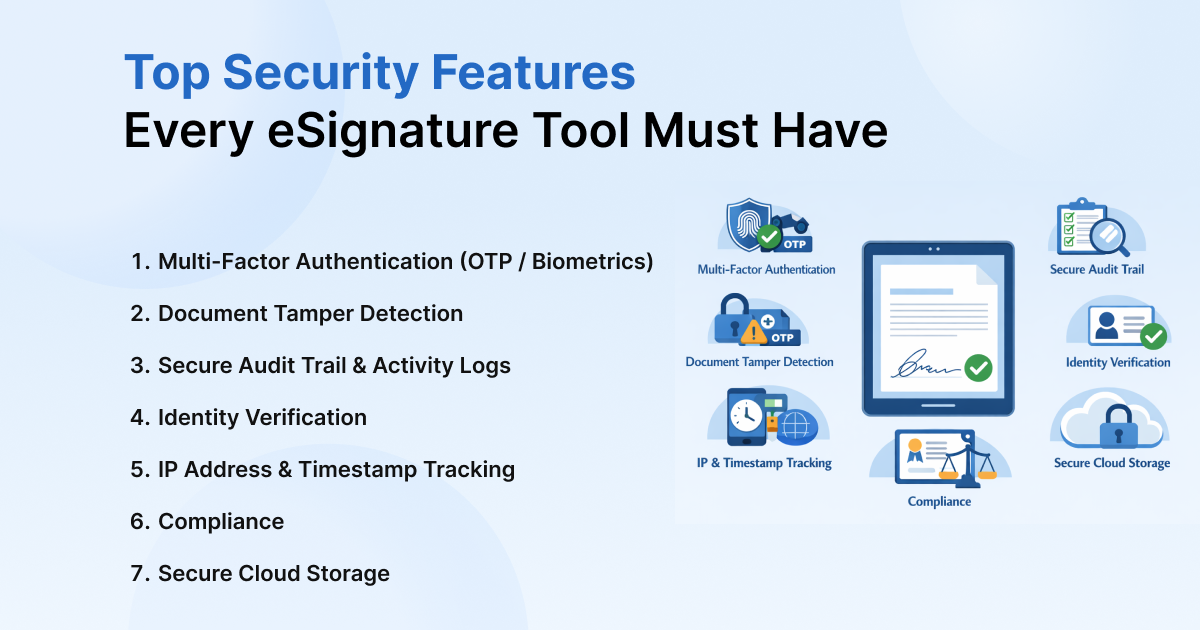
The shift from physical to digital paperwork is no longer a trend; it is the global standard. However, as we move through 2026, the landscape of cyber threats has shifted. The rise of AI-generated deep fakes, sophisticated phishing, and automated identity theft has made eSignature security the top priority for C-suite executives, legal teams, and IT administrators alike.
When a multi-million-dollar contract, a sensitive HIPAA-compliant medical record, or a cross-border trade agreement is on the line, simply “clicking a button” isn’t enough. You need ironclad eSignature security features that can withstand forensic scrutiny in a court of law.
This comprehensive guide breaks down the non-negotiable eSignature security features every modern tool must have to ensure your agreements are as safe as they are seamless.
Multi-Factor Authentication (MFA) & Signer Identity Verification
The biggest vulnerability in digital signing isn’t the document—it’s the person behind the screen. If an email account is compromised, a hacker can easily “sign” a document on behalf of the victim. This is why secure eSignature tools must offer layered identity verification.
In 2026, the industry has moved beyond simple passwords. A professional-grade tool should offer the following:
- SMS and Email OTP: A baseline requirement where a one-time code is sent to a secondary device to ensure the signer has access to the registered phone number.
- Knowledge-Based Authentication (KBA): Verification that asks the signer questions only they would know, pulled from credit bureaus or public records.
- Biometric Verification: Utilizing the hardware on smartphones to require a face or fingerprint scan before the “Sign” button becomes active.
- Government ID Uploads: Modern tools now use AI-driven computer vision to scan passports or driver’s licenses in real-time. These systems check for holograms and watermarks to ensure the ID is physical and valid.
By implementing these eSignature security features, companies can move from “presumed identity” to “verified identity”, significantly reducing the risk of fraud.
Public Key Infrastructure (PKI) & Digital Certificates
While many people use the terms “electronic signature” and “digital signature” interchangeably, they are technically and legally different. A secure PDF signing tool uses public key infrastructure (PKI) to create a cryptographic bond between the signer and the document.
How PKI Protects Your Data
PKI is the gold standard of digital signature security features. It uses a mathematical “key pair”:
- The Private Key: This is kept securely by the signer (or managed by the secure tool) and is used to “seal” the document.
- The Public Key: This is made available to anyone who needs to verify the signature’s authenticity.
When a document is signed using PKI, the tool issues a digital certificate. This certificate is backed by a Certificate Authority (CA)—a trusted third party that “vouches” for the identity of the person who holds the private key. This ensures non-repudiation, a legal term meaning the signer cannot later claim they didn’t sign the document in court.
Need a Custom Security Architecture?
For industries like healthcare, finance, and law, “standard” security isn’t enough. Speak with one of our digital trust experts to build a custom, HIPAA- or eIDAS-compliant signing workflow for your team.
[Book a Free Security Strategy Call]
Tamper-Evident Technology: The Digital Seal
One of the most common questions from skeptics remains: “How safe are online signatures if someone edits the PDF after I sign?”
The answer lies in tamper-evident technology. The moment a document is finalized, a professional tool creates a “hash” (a unique digital fingerprint) of the entire file. If even a single comma is changed, a page is reordered, or a hidden metadata field is modified, the cryptographic hash will no longer match.
Most online signature verification tools (like Adobe Acrobat or specialized web validators) will immediately flag the document with a red warning if the integrity has been compromised. This “digital seal” ensures that what you signed is exactly what is being stored.
The Forensic Audit Trail: Your “Digital Chain of Custody”
In a legal dispute, the “signature” image itself is often the least important piece of evidence. What matters is the data surrounding the event. A comprehensive audit trail in eSignature workflow is the ultimate defensive shield for any business.
A high-quality, legally admissible audit log must capture:
- IP Addresses: The unique network identifier of the device used to sign.
- Detailed Timestamps: Exact UTC markers for when the document was sent, opened, viewed, and signed.
- Device Metadata: Information on the OS (e.g., iOS 19, Windows 12) and the browser used.
- Consent Records: Explicit logging of the signer’s agreement to do business electronically.
This audit trail in eSignature tools provides a “chain of custody” that is often more robust and harder to forge than a physical “wet ink” signature on a piece of paper.
Cloud-Based eSignature Security & Encryption
Since the vast majority of modern agreements are handled via the web, cloud-based eSignature security is paramount. Your provider must protect data in two distinct states:
- Encryption In-Transit (TLS 1.3): This ensures that as the document travels from the sender to the signer and back to the server, it cannot be “sniffed” or intercepted by hackers on public Wi-Fi or compromised networks.
- Encryption At Rest (AES-256): This is the same level of encryption used by military organizations. It ensures that if the provider’s database were ever breached, the documents themselves would remain unreadable, encrypted “blobs” of data without the master decryption keys.
Furthermore, look for providers that offer single-tenant architecture or private cloud options for highly sensitive industries, ensuring your data is never co-mingled with other companies’ files.
Global Compliance & Industry Certifications
Security isn’t just about the strength of the code; it’s about meeting the rigorous standards set by international law. When evaluating eSignature security, check for these specific certifications:
| Regulation | Region/Industry | Significance |
| ESIGN & UETA | United States | Ensures the signature is legally “equivalent” to paper |
| eIDAS (AES/QES) | European Union | The gold standard for cross-border legal validity |
| ISO 27001 | International | Proves the company has a “security-first” culture |
| SOC 2 Type || | Enterprise | Third-party proof that security controls work over a long period |
| HIPAA/21 CFR Part 11 | Health/Pharma | Critical for protecting patient data and clinical trails |
Choosing a tool that satisfies the eIDAS “Qualified Electronic Signature” (QES) standard is particularly important for 2026, as it provides the highest level of legal presumption of adequacy across the globe.
See How We Stack Up
Compare our digital signature security features against the industry’s top providers in one simple chart.
Role-Based Access Control (RBAC) & Document Retention
Security doesn’t end once the document is signed. Who in your company can see that contract six months from now? Secure eSignature tools must provide granular role-based access control (RBAC).
This means an HR coordinator might be able to send an offer letter but cannot view the CEO’s compensation agreement. Additionally, “Document Retention Policies” allow companies to automatically delete or archive documents after a set period, reducing the “data footprint” and minimizing the impact of a potential future breach.
AI-Powered Fraud Detection: The New Frontier
As we navigate 2026, the best secure eSignature tools have integrated AI to monitor for anomalies in real-time. AI can detect patterns that humans miss:
- Velocity Checks: Is a user trying to sign 50 high-value contracts in 30 seconds?
- Geographic Anomalies: If a user typically signs from London but suddenly logs in from a known “high-risk” IP range, the system can automatically trigger a “Step-Up Authentication” (requesting a biometric scan or a live video “liveness” check).
- Behavioral Biometrics: Analyzing the way a person types or moves their mouse to ensure it matches the historical profile of the authorized user.
Also Read: Are Electronic Signatures Safe? Key Security Facts
Conclusion: Trust is the New Currency
Selecting an eSignature provider based on price alone is a dangerous gamble. In a world where digital forgery is becoming easier, your security infrastructure must be your strongest asset. By prioritizing PKI encryption, a forensic audit trail, and MFA, you protect your business from the mounting risks of the digital age.
A secure eSignature isn’t just a convenience—it’s a legal and technical shield that ensures your business’s most important promises remain unbroken.